Keyboard shortcuts
Shortcuts work anywhere in the app, including the prompt box, except as noted under Good to know.
How to use
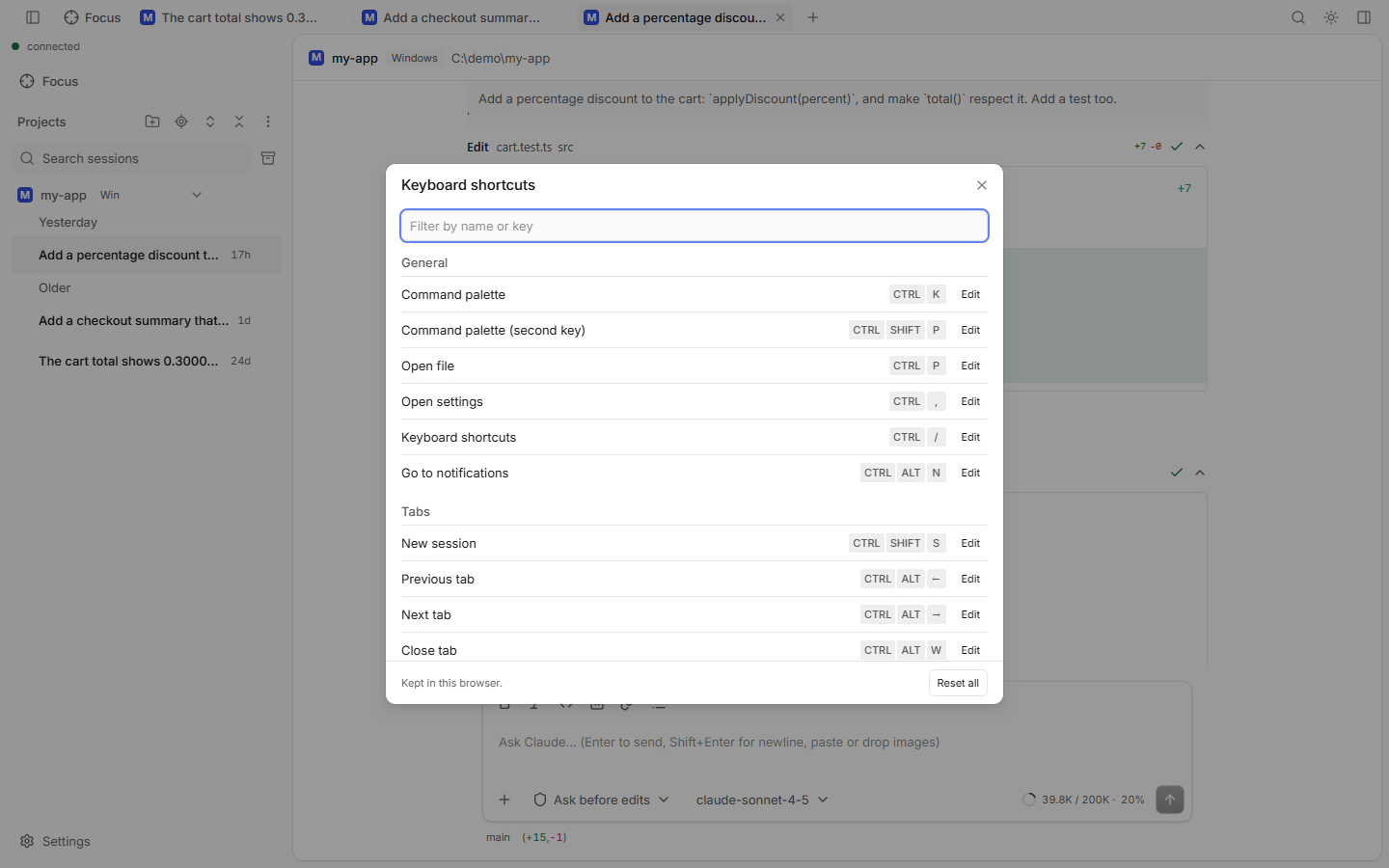
- Press Ctrl+/ (⌘ / on a Mac) to open the Keyboard shortcuts dialog.
- Type in Filter by name or key to find one.
- Click Edit next to it and press the new keys. Esc cancels, Backspace removes the shortcut.
- The reset button next to a changed shortcut brings back the default. Reset all resets every one.
- Your changes are kept in this browser only.
General
| Action | Windows / Linux | macOS |
|---|---|---|
| Command palette | Ctrl+K | ⌘ K |
| Command palette (second key) | Ctrl+Shift+P | ⌘ ⇧ P |
| Open file | Ctrl+P | ⌘ P |
| Open settings | Ctrl+, | ⌘ , |
| Keyboard shortcuts | Ctrl+/ | ⌘ / |
| Go to notifications | Ctrl+Alt+N | ⌘ ⌥ N |
Tabs
| Action | Windows / Linux | macOS |
|---|---|---|
| New session | Ctrl+Shift+S | ⌘ ⇧ S |
| Previous tab | Ctrl+Alt+← | ⌘ ⌥ ← |
| Next tab | Ctrl+Alt+→ | ⌘ ⌥ → |
| Close tab | Ctrl+Alt+W | ⌘ ⌥ W |
| Close tab group | Ctrl+Alt+Shift+W | ⌘ ⌥ ⇧ W |
| Reopen closed tab | Alt+Shift+T | ⌃ ⇧ T |
| Go to tab 1 to 8 | Alt+1 … Alt+8 | ⌃ 1 … ⌃ 8 |
| Go to last tab | Alt+9 | ⌃ 9 |
Panels
| Action | Windows / Linux | macOS |
|---|---|---|
| Toggle sidebar | Ctrl+B | ⌘ B |
| Toggle side panel | Ctrl+Shift+R | ⌘ ⇧ R |
| Toggle file tree | Ctrl+\ | ⌘ \ |
| Show files | Ctrl+Shift+E | ⌘ ⇧ E |
| Show changes | Ctrl+Shift+G | ⌘ ⇧ G |
| Show git graph | Ctrl+Shift+H | ⌘ ⇧ H |
| Toggle signal only | Ctrl+Alt+S | ⌘ ⌥ S |
| Toggle terminal | Ctrl+` | ⌃ ` |
| New terminal | Ctrl+Shift+` | ⌃ ⇧ ` |
Session
| Action | Windows / Linux | macOS |
|---|---|---|
| Next waiting request | Ctrl+Alt+↓ | ⌘ ⌥ ↓ |
| Focus prompt | Ctrl+L | ⌃ L |
| Change model | Ctrl+' | ⌘ ' |
Prefix key
Press Alt+A (like tmux), let go, then press one more key within 1.5 seconds:
| Then press | Does |
|---|---|
| c | New session |
| n | Next tab |
| p | Previous tab |
| 1 … 9 | Tab 1 to 9 (9 = last tab) |
| x | Close tab |
| t | Terminal |
| f | Files |
| g | Changes |
| s | Sidebar |
| z | Focus prompt |
| , | Settings |
| ? | Shortcuts |
| : | Command palette |
In the prompt box
These are fixed (not in the registry).
| Key | Does |
|---|---|
| Enter | Send (while Claude works: steer, see The prompt box) |
| Shift+Enter | New line |
| Shift+Tab | Next permission mode |
| Esc | Stop the running turn |
| ! at the start | Bash mode: the line runs as a shell command |
| Ctrl+B / I / E | Bold / italic / inline code (⌘ on a Mac) |
Good to know
- On Windows and Linux some keys use Alt because the browser keeps Ctrl+T, Ctrl+W, Ctrl+Tab and Ctrl+1…9 for itself.
- The recorder refuses keys that would break typing: a key without Ctrl, Cmd or Alt, AltGr characters, macOS Option characters, and the prompt box's editing keys (copy, paste, undo, word jumps).
- Ctrl+B toggles the sidebar, except in the prompt box, where it makes text bold.
- In the terminal panel, plain Ctrl+letter keys go to the shell. Shortcuts with Alt, the tab keys, the palette, the shortcuts dialog and the terminal keys still reach the app.